Supervising several road construction projects at once requires careful coordination, consistent reporting, and quick access to reliable data. To manage all of this efficiently, I’ve built a digital supervision system using Notion — a flexible platform that helps me organize site activities, monitor progress, and document field observations in real time.
One Master Database, Multiple Views
At the heart of my setup is a master database that holds all daily observations for every project. Each entry represents a site visit or report and includes key properties such as:
- Reporting Date – the day’s inspection or observation date.
- Project – a select property identifying the road project being monitored.
- Weather – a select property recording conditions on site (e.g., sunny, overcast, or rainy).
- Component Being Constructed – a select property describing the work activity underway (e.g., sub-base, base course, asphalt paving, drainage).
This single database serves as the foundation for all the different views I use to track project progress and site activity.
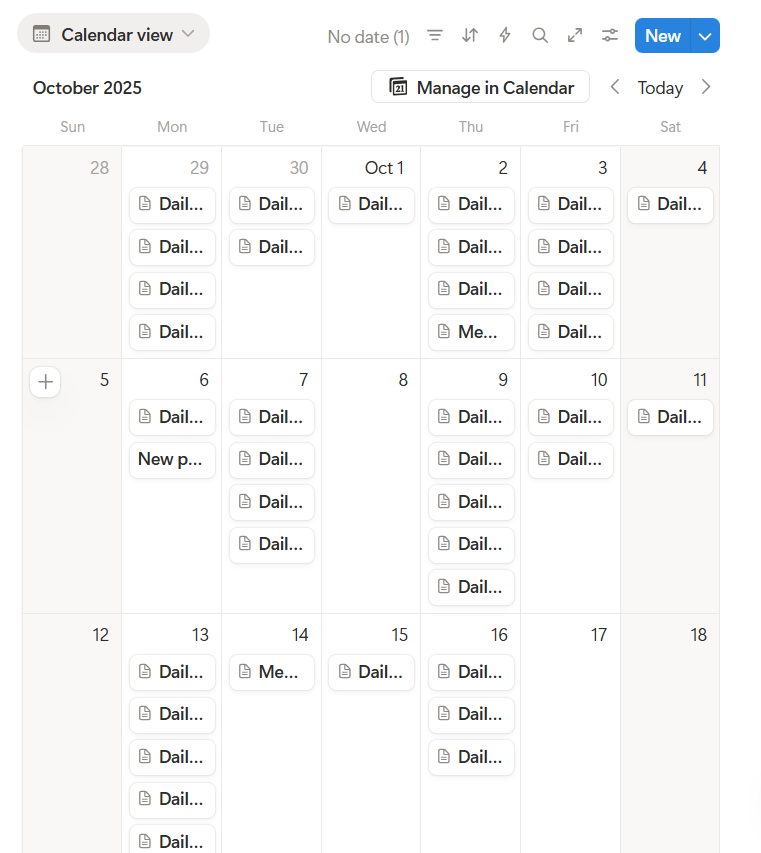
Calendar View – Daily Supervision at a Glance
The calendar view helps me visualize site visits and reports by date. It gives a quick snapshot of when each project was visited and what was done on that day. By filtering the calendar by project, I can easily review progress on specific roads and compare activity across multiple sites.
Timeline View – Start Dates and Project Duration
In addition to the calendar, I use a timeline view that shows the start dates for all projects. This helps track project durations, highlight overlapping activities, and maintain a clear sense of where each project stands in relation to its schedule.
Linked Databases and Board View – Tracking Project Stages
To get an overview of progress, I also use a linked database with a board view. Each card represents a project, and I can easily drag and drop them between stages such as Planning, Active Construction, Near Completion, or Completed.
This visual layout makes it easy to see which projects are moving forward, which are facing delays, and which are ready for inspection or handover.
Filtered Views for Project-Specific Insights
Within each project’s Notion page, I’ve created filtered views of the master database. These show only the entries related to that specific road or construction site. This setup allows me to drill down from the overall supervision record to daily observations for an individual project — without losing the connection to the larger database.
Bringing It All Together
This digital workflow means that every site visit, observation, and update is stored in one place, but can be viewed in multiple ways depending on what I need to see:
- By date: when projects were visited.
- By project: which roads were monitored.
- By stage: how far along each project is.
By using Notion’s combination of calendar, timeline, and board views, I’ve created a simple yet powerful system for managing multiple road construction projects simultaneously — improving visibility, consistency, and decision-making across all sites.
Supporting Better Reporting and Collaboration
This setup also makes it much easier to prepare weekly and monthly reports, share updates with management, and coordinate with contractors. Each project’s record is complete with dates, weather data, photos, and progress notes — reducing the need to search through messages or paper logs.
As a result, project information stays organized, communication is clearer, and decisions are based on accurate, up-to-date records. Notion has effectively become my digital command center for supervision — transforming how I manage multiple construction projects from planning to completion.
ai artificial-intelligence asphaltic concrete bitumen business camera climate-change compaction construction Defect Delays density Dropbox environment Google Photos material-testing mdd microsoft nature notion omc OTG Cable photography productivity rain Rain Event real-estate roadway sharepoint Stakeholder Supervision tech technology temperature time-management travel Water Water supply weather writing
Discover more from Troy Marshall | Field to Digital
Subscribe to get the latest posts sent to your email.
